
How to make your LinkedIn articles easier for AI to find, and quote
Ten ways to make LinkedIn expertise easier for ChatGPT, Claude, Le Chat, Perplexity and other LLMs to find, understand and quote.
🏛️ A public affairs director in Brussels opens Perplexity and types:
“What does the AI Act require from companies using LLMs in 2026?”
🚘 A mobility journalist asks Claude:
“How could the EU’s automotive package affect carmakers’ 2035 targets?”
🧭 A policy officer asks ChatGPT:
“Which organizations have published useful views on the EU’s approach to AI transparency?”
Somewhere, a team that knows the answer is sitting on three years of work, 40 slides, a consultation response, and 17 internal emails titled “final_FINAL_v8”.

Source: Supermeme.ai
None of it will be cited if it stays there.
At The Think Room, we help clients turn specialist knowledge into content that people can find and use: on LinkedIn, in policy conversations, and increasingly in AI answers. Through our work with Ceyo AI, we also track how organizations appear across AI systems and where their voice is missing.
Meltwater analyzed LinkedIn articles cited by AI search tools. The findings were fairly reassuring for anyone who prefers useful content over vague “thought leadership”: clear headings, lists, named entities, data and comparisons appeared again and again.
Check the PDF here
Source: Meltwater and LinkedIn 2026 Report
Let's dive in.
1. Start with the question you're answering
The strongest content begins where a reader begins: with a problem they need to solve, a real question people have.
A weak title: “My thoughts on the AI Act.”
A more useful title: “What does the AI Act’s August 2026 transparency deadline mean for companies using AI-generated content?”
The second one gives the reader clarity on what comes next, beyond the credibility of the author. It also gives an LLM a clear answer to retrieve.
2. Summarize the post at the very beginning
Give people something they can quote before the scrolling begins.
For an AI Act post, this might be:
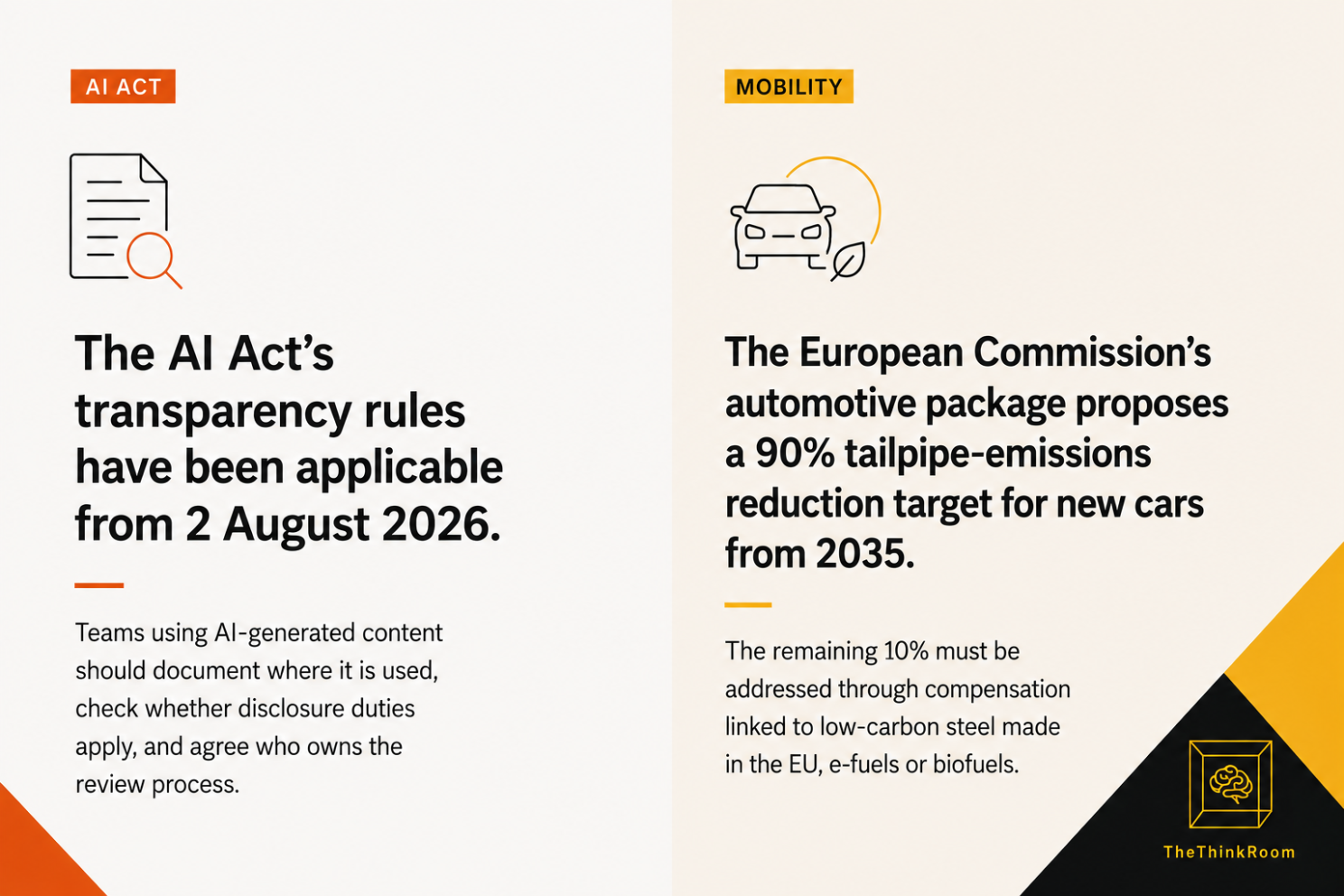
The AI Act’s transparency rules have been applicable from 2 August 2026. Teams using AI-generated content should document where it is used, check whether disclosure duties apply, and agree who owns the review process.
Then add the detail: which content, which team, which legal question, which deadline.
Source: The Think Room (co-created with ChatGPT)
For a mobility client, it could be:
The European Commission’s automotive package proposes a 90% tailpipe-emissions reduction target for new cars from 2035, with the remaining 10% addressed through compensation linked to low-carbon steel made in the EU, e-fuels or biofuels.
That opening is far more useful to a reader than “exciting news for the automotive sector”.
Because.... nobody has ever searched an LLM for “exciting news”.
3. Give the post structure
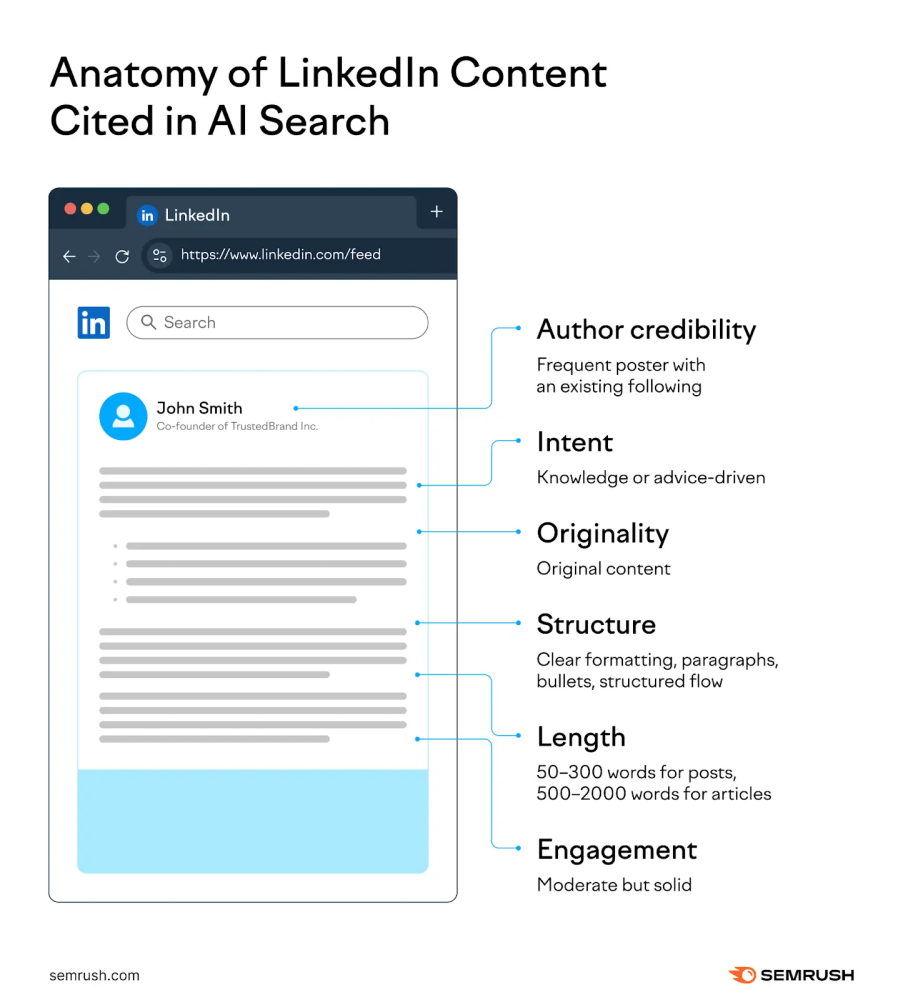
Meltwater found that all of the top-cited LinkedIn articles in its study used bullet points or numbered items. Ninety-two percent used clear H2 or H3 headings.
An LLM needs to identify the question, the answer and the evidence. So does anyone opening LinkedIn between two meetings.
Use headings that contain the terms people will search for:
What applies under the AI Act from August 2026?
Which AI Act deadlines matter for communications teams?
What does the EU automotive package propose for 2035?
How should automotive suppliers explain their position on CO₂ targets?
Which sources should policy teams cite when writing about EU mobility rules?
“Some reflections” is a lovely heading for a private notebook. It does very little for search.
Source: SEMRUSH
4. Name files, institutions and things
“AI regulation” could mean almost anything.
Write EU AI Act, Article 50, general-purpose AI models, European Commission AI Office, European Parliament, CO₂ standards for cars and vans, clean corporate vehicles, ChatGPT, Claude, Perplexity, Ceyo AI.
Meltwater found that 75% of top-cited LinkedIn articles named specific companies, people, products or tools. That precision makes a difference.
Compare these two opening lines:
Unbelievable what the Commission has just approved!
The Commission’s automotive package includes proposed changes to CO₂ emission standards for new cars and vans, a battery booster strategy, an automotive omnibus and a proposal on clean corporate vehicles.
To have an AI quote you an engaging hook is far less important than a clear summary of what will be covered in your article.
5. Answer the question people are really asking
A policy team often knows the issue inside out. The wording on LinkedIn still needs to be adapted to the reader.
For an automotive association, avoid this: “Our position on Regulation (EU) 2019/631 and the wider policy debate.”
Try this:
Will the EU’s proposed 2035 car target change what suppliers need to prepare for now?
Then answer it in plain language.
The Commission has proposed a 90% tailpipe-emissions reduction target for new cars from 2035. Suppliers should follow the detail behind the proposed compensation mechanisms, including low-carbon steel made in the EU, e-fuels and biofuels. The political process is still active, so this is a file to track rather than a line to copy into next year’s strategy document.
A policy professional sees their question. A journalist sees a credible source. An LLM sees a direct response tied to named legislation.
6. Bring proof
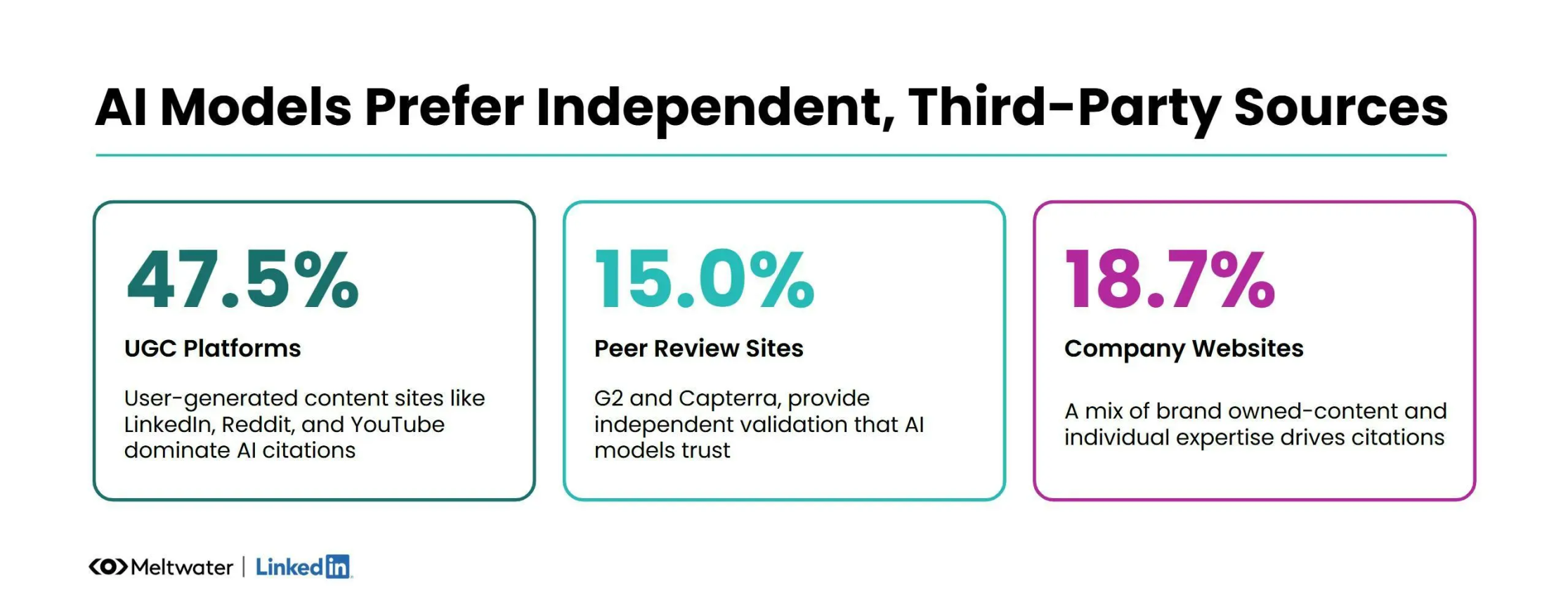
Meltwater found hard numbers or data in 67% of the top-cited LinkedIn articles it reviewed. Numbers work when they answer a reader’s question.
A useful AI Act post might include:
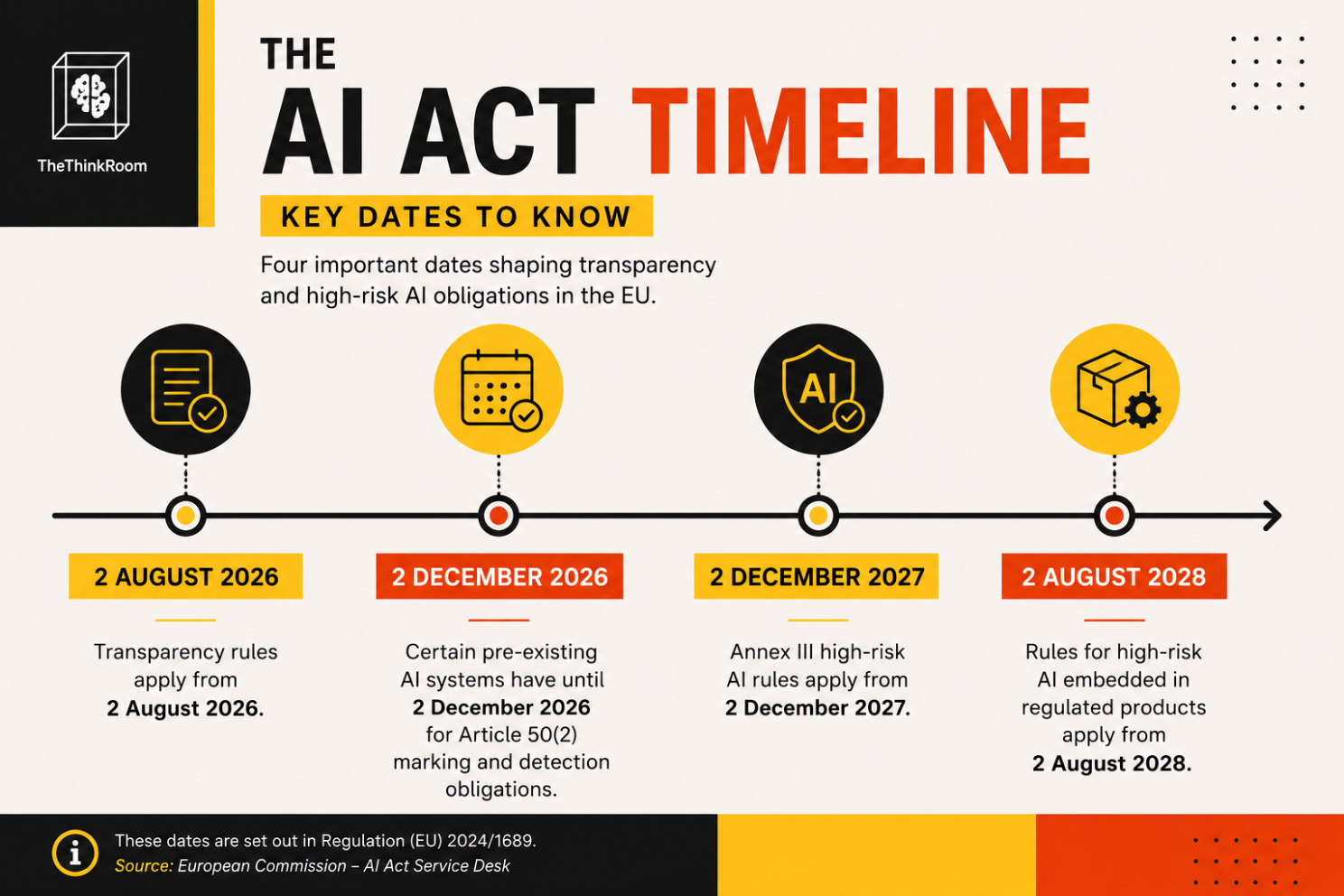
Transparency rules applied from 2 August 2026.
Certain existing providers have until 2 December 2026 for Article 50(2) obligations.
Rules for high-risk systems in Annex III apply from 2 December 2027.
Rules for high-risk AI embedded in regulated products apply from 2 August 2028.
A useful automotive post might include:
The existing EU fleet-wide target for new cars is a 15% CO₂ reduction against the 2021 baseline for 2025 to 2029.
The Commission’s automotive package proposes a 90% reduction target for 2035.
Adding source links helps. It lets readers check the claim, gives journalists a route to the original material, and stops the comments section becoming a small litigation department.
Source: Meltwater and Linkedin 2026 Report
7. Compare and evaluate
Half of Meltwater’s most-cited LinkedIn articles contained a comparison or evaluation method. That makes sense. A large share of AI prompts are decision prompts.
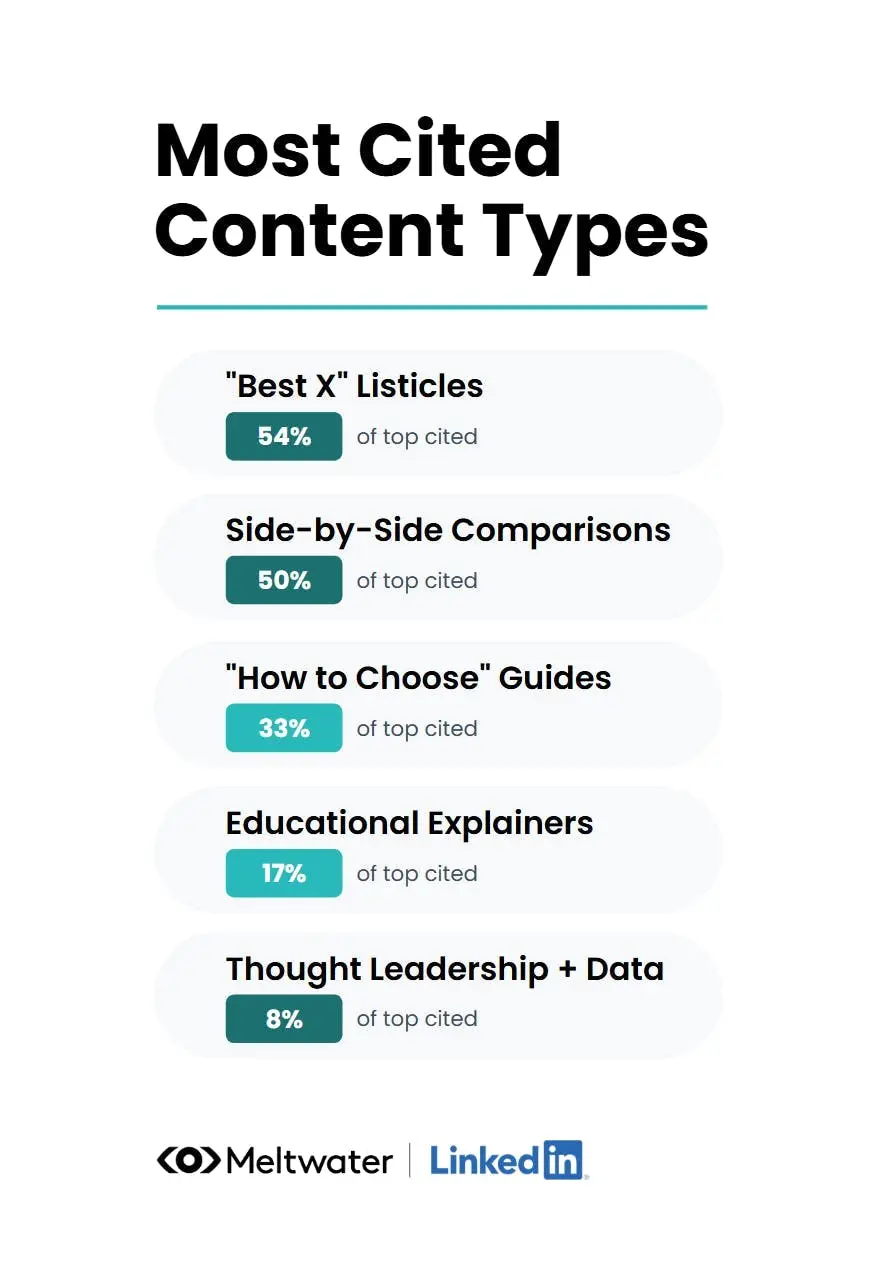
Source: Meltwater and Linkedin 2026 Report
Here is an example:
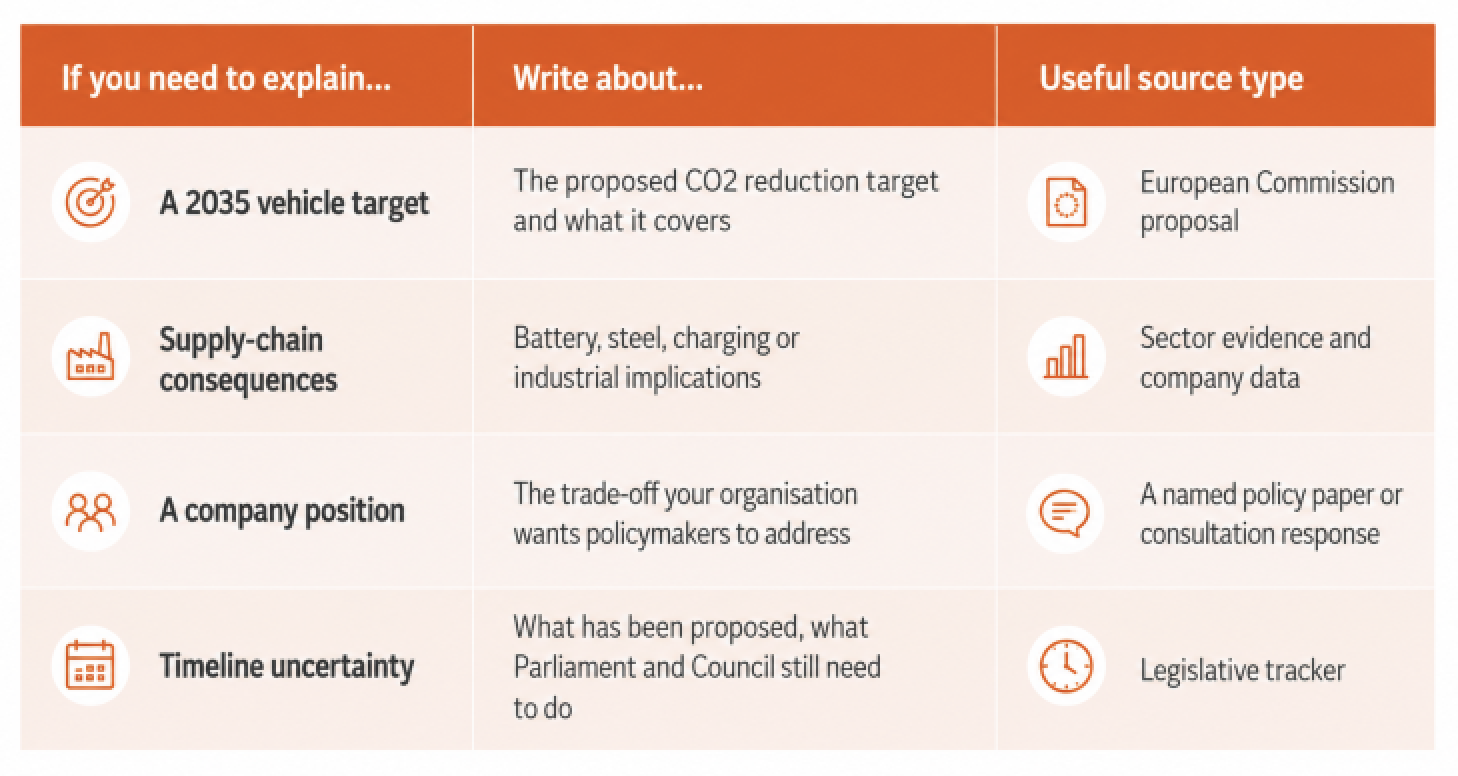
A table also gets saves and saves get your posts a second life.
8. Use 1500-2500 words
Meltwater’s sample pointed to 1,500 to 2,500 words as the useful range for deeper LinkedIn articles, with a median of 1,725 words among the highly cited articles.
That does not mean every post and article needs 1,700 words. Substance is always the most important thing. And if you have ever used AI for content generation you will have noticed it has a tendency to over-explain, repeat, and over-summarize. DON'T DO THAT.
A short LinkedIn post can introduce a point, test a position or direct people to a longer piece.
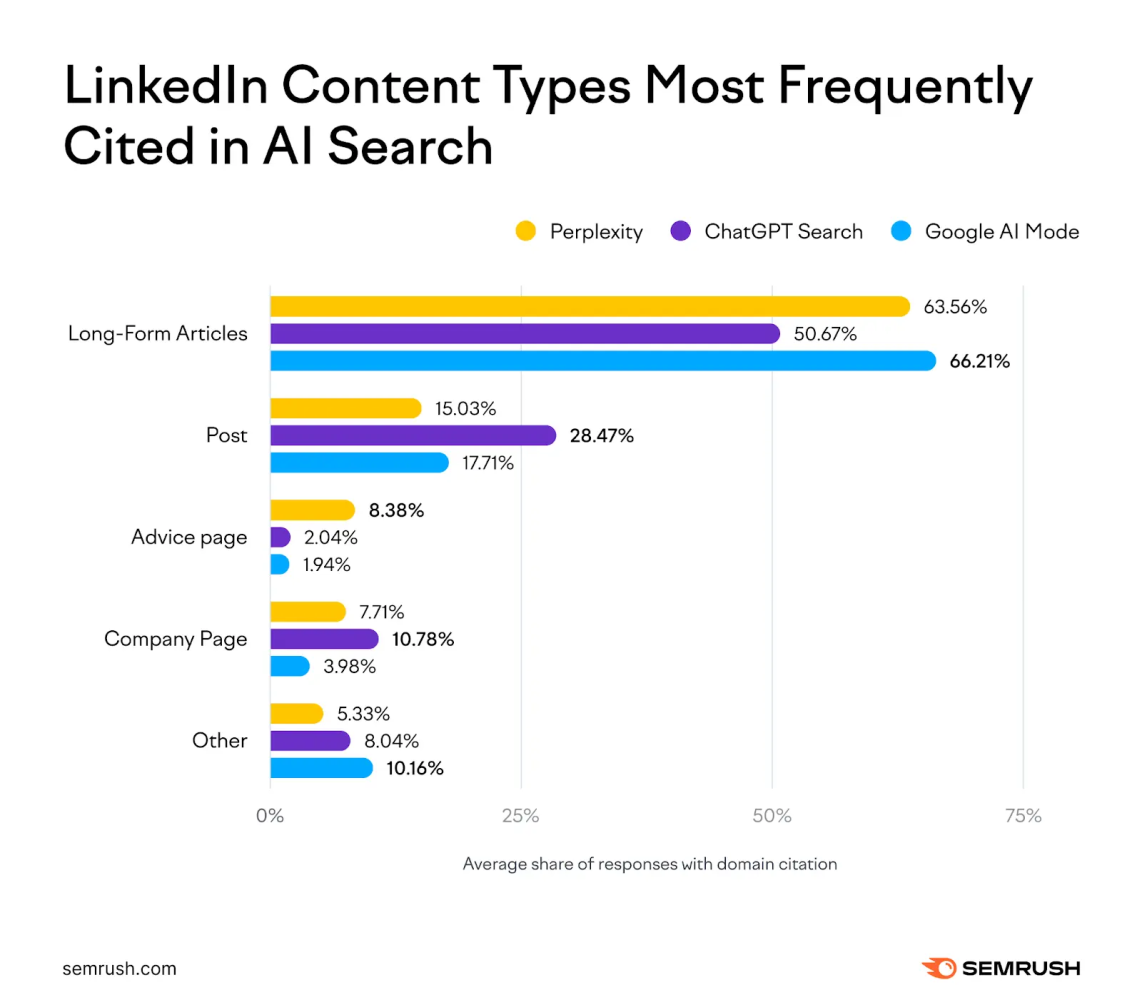
Source: SEMRUSH
For clients, we usually turn one long form piece (a podcast, an article, interview or policy paper, ideally in someone's own voice) into several, sometimes dozens pieces of content:
Short posts reacting to a deadline or political development.
An explainer article answering the question people will search.
A carousel with dates, definitions or comparisons.
A spokesperson post with a clear point of view.
Video snippets for visual explainers
A website page that brings all the information together (for important topics).
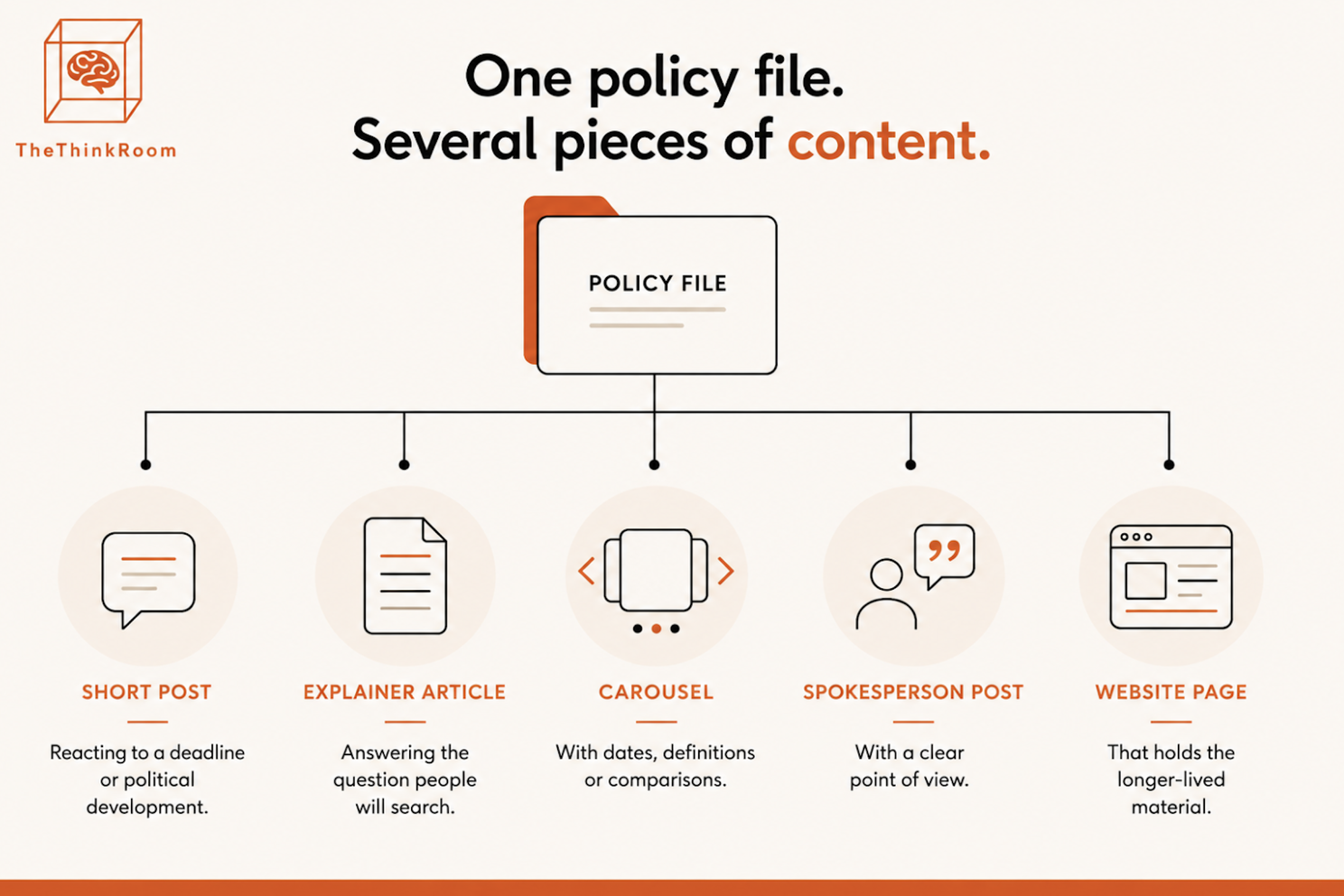
The point is repetition with purpose. People and AI need to encounter your expertise more than once before they associate it with you. The different formats are important because different people prefer different formats, and it also keeps things interesting.
9. Use images, with alt text
Images are good when they make the post easier to understand, easier to save or easier to notice.
🖼️ A photo of a policy panel can work if the post refers to a moment from that panel.
🖼️ A chart can work if the reader can understand the chart without guessing what the colors mean.
🖼️ A 8-slide carousel can work well for an AI Act timeline or a comparison of automotive policy proposals.
A decorative stock photo of a robot shaking hands with Brussels is doing very little for anyone. Avoid this.
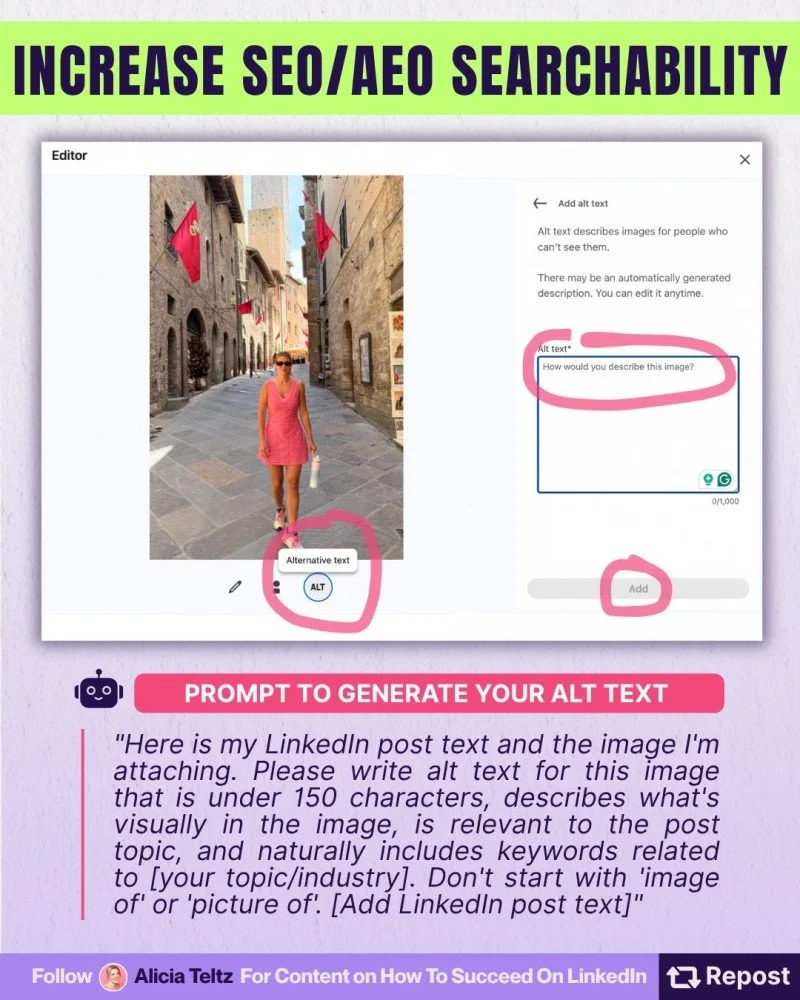
Alt text should describe the image and its useful content. LinkedIn allows alt text on images shared in the feed and images embedded in articles. Screen-reader users can access it, even though it is not displayed to other members. See Alicia Teltz great explanation below.
Source: Alicia Teltz's Linkedin
For a newsletter about the AI Act, you could use a simple chart or carousel.
Alt text: “Timeline of AI Act dates: transparency rules apply from 2 August 2026; certain pre-existing AI systems have until 2 December 2026 for Article 50(2) marking and detection obligations; Annex III high-risk AI rules apply from 2 December 2027; rules for high-risk AI embedded in regulated products apply from 2 August 2028.”
Source: The Think Room
10. Get an AI visibility dashboard
With Ceyo AI, we monitor how our clients appear across AI systems, where competitors appear instead, which questions produce weak answers and which sources are being cited. Ceyo tracks visibility and helps you optimize your web presence. We can also see which LLMs like you and which don't as it is not a one-size-fits-all strategy. (Contact us for our very affordable monthly packages.)
Source: Ceyo AI's Linkedin
Then the work becomes editorial.
A client may discover that Gemini associates them with an old announcement instead of their current policy position. Another may be absent from a question they should own. A third may appear, though below a competitor who has published a much clearer explainer.
That is where content work gets interesting.
Write the missing answer, add evidence, name the file, publish the longer explanation. Link related posts and pages. Check again.
That's it. Those are the 10 things you can do to make your articles more findable and quotable by Large Language Models.
Start with the question or problem you're solving with the article
Summarize the post at the very beginning of the article
Give the article structure with bullet posts and H2/H3 headings
Use concrete names
Answer the question people are really asking, use their language not yours
Bring proof and add hard numbers or data
Add comparisons and evaluations
Use between 1500-2500 words (but substance still is the most important thing.)
Use images with alt-text
Get an AI visibility dashboard
If you made it to the end, give us a sign.
And thank you for reading (or scrolling.)
As always, yours,
The Think Room team
We make you visible, credible and human in the age of algorithms
